Showing posts with label SEO. Show all posts

Amazing Tips For Increasing Backlinks Free 2016


how to create backlinks

Tips For Increasing Rank And Get High Quality Backlinks

To Increase traffic We Can Do Anything for our blog .Like share our blog on social media and optimized on page and off page seo.  Today we will learn a type of offpage seo.  By which we easily increase our backlinks .And we can increase our blog google rank.For increasing backlinks we have two option
1)Increase backlinks by guest posting2)Post your link in comment in high rank website.

Tips For Increasing Rank And Get High Quality Backlinks


If we have good backlinks and more backlinks then our google and other search engine rank will increase .All of you know when our blog rank is increased we have come more traffic. And also increased our earning.Today we will discuss free tips by which we can easily increased our backlinks totally free of cost.  And in easy tip which we discuss  that how to write a well and good comment on high ranking website .Because i resist all that dont do direct link.Because by gaving direct link.that is danger for our ranking. We do a comment in manner that our backlings increased to get good and more backlings.
For better understanding read this


1) <a href="http://masterkpk.blogspot.com"/>here text</a>2)Remove this masterkpk.blogspot.com  from above code and add your blog adress3)And any text in text section which you want to show4) Now copy the code and paste it in any high rank website in comment.


Loss rank by giving direct link


As the starter bloggers knows that by giving direct link will increase backlinks .But do a fault  instead of increasing his ranks they loss their rank because his blog is new and haven't better rank in google and when he giving direct link in comment  on high rank website then when he write his blog name in google search .Instead of showing his blog search engine show the part of high rank website where he giving his direct link in comment .Because the rank of those blog is high then yout so safe yourself from doing this because you will lose your rank the result you have no traffic from search engine If you follow my tips you search engine rank and traffic will be increase inshaallah.


better place for comment backlinks


Try to do comment in such high rank website which is related to your content  And be safe yourself to commenting in such places where is wrong information  which is against the google and other search engines

AT LAST

AT last we hope all you will understand how to commenting and how to get backlinks free please share this article 

How to Add Facebook Like Box in Blogger [Error Fixed] 2016

add facebook

How To Add Facebook Widget In Blogger And How To Fix Error:

Fb like box also termed as fb fan box has continually taken into consideration as the most important part of a website. It permits the blog proprietors to provide their customers with an clean and convenient manner to join their fb network with in few clicks.peoples that joins your community on fb might receive updates at once into this information feeds. However, in this post, we will show you a way to add the fb fan box in blogger.
like facebook


since, it's far viable to add a facebook fan box manually then there's no want to apply stressed plugins or gadgets that could decrease the velocity of your web page. The first factor you want to do is to go to facebook social plugin’s like box web page. Now enter the whole url of your facebook page for which you are willing to generate the fan field. It entirely depends on you want how lots change  you want.

facebook like widget


Now press the “get code” button to get the coding that you'll be imposing to your web page.

Fb provides a plenty of alternatives for implementation. You could select from numerous alternatives like java script sdk , iframe. For us  java script sdk  is a widespread option. However, xhtml also works quite well. Try and use iframe if the java script sdk   does no longer works for you.
like box facebook


Now click on on the javascript tab. copied the first a part of the code and paste it right after the <body> tag that is commonly observed in template >> edit html place. However, if you are unable to locate it then you can add it everywhere to your template. The first a part of the code might particularly look like this

<div id="fb-root"></div>
<script>(function(d, s, id) {
  var js, fjs = d.getElementsByTagName(s)[0];
  if (d.getElementById(id)) return;
  js = d.createElement(s); js.id = id;
  js.src = "//connect.facebook.net/en_GB/sdk.js#xfbml=1&version=v2.7";
  fjs.parentNode.insertBefore(js, fjs);
}(document, 'script', 'facebook-jssdk'));</script>

Now copy the second a part of the code and add it anywhere for your website and it might show the like field there. For instance, visit format >> add a layout >>add gadget>> add html/javascript
like box

>> and paste the code there. The second one a part of the code would relatively appear like this

<div class="fb-page" data-href="https://www.facebook.com/masterkpkhan/" data-small-header="false" data-adapt-container-width="true" data-hide-cover="false" data-show-facepile="true"><blockquote cite="https://www.facebook.com/masterkpkhan/" class="fb-xfbml-parse-ignore"><a href="https://www.facebook.com/masterkpkhan/">Masterkpk</a></blockquote></div>

Congratulations: your facebook like box is prepared, now move and check your web page to look it whether or not it is working perfectly exceptional or now not. If you nonetheless face errors, then attempt the alternative methods.and for details learning dont miss our video


Facebook Plug In Showing Error [Fixed]


But when you show some error or note showing fb like  box  on your website then follow this instruction carefully....
The above code which we paste in <body> tag search below code and change this  code

   js.src = '//connect.facebook.net/en_US/sdk.js#xfbml=1&version=v2.5';


with


   js.src = '//connect.facebook.net/en_US/sdk.js#xfbml=1&amp;version=v2.5'; 

SO finally we fixed error also so we discussed that how to add facebook like box.Hope you people will understand so for any problem please comment below

....IF YOU SHARE THIS ARTICLE ITS BE YOUR KINDNESS....

How to Upload or Install custom Template in Blogger 2016

blog html template

Custom Template


Blogger is present by Google that have free blogging instruments to its customers for totally free. You don't need to burn through cash to purchase costly web facilitating servers to begin an online journal With Blogger, as others(wordpress,etc) as a matter of first importance you have to do is to join to blogger.com with your Google record and make free blog in the event that you regard distribute your web journal. Be that as it may, each online journal needs a popular, expert and astounding outline that draw in guests, as well as Search engines.also visit How To Submit Your Site In Google In Urdu/Hindi 2016 

As we realize that Blogger bolsters XML web formats, you can make or transfer your own, or there are a large number of sites on web accessible that gave FREE XML Blogger Templates. 

This post will give an orderly guidines on the best way to apply and set new xml Blogger layout to your online journal. This procedure can rely on upon numerous components (coding in the new layout, you're existing gadgets, and so on) so watchful when you change your template.just take after these regulated directions beneath 


Pick a Professional Template 


Above all else and most imperative, you need to pick a perfect format for your website which is solid as well as comes pre-advanced for Search engines.We have proficient layout which is utilized by numerous blogger name JPSTATION

blog template design

                                    LIVE DEMO           DOWNLOAD NOW


Steps


STEP (1)  First of all download above or  any free blogger templates and then open the zip file with the help of winrar
blogger templates


STEP (2) Second is open this zip file and click on xml file and press ctrl+c and see next
blogger template designer

STEP (3)paste those xml file which we copied in any folder
blogger templates free

STEP (4) Open blogger dashboard
free template blogger

STEP (5) Click on template
blogger free templates
STEP (6) So that is our defiult blogger template

blog templates for blogger
and click on above option BACKUP/RESTORE
custom blogger templates
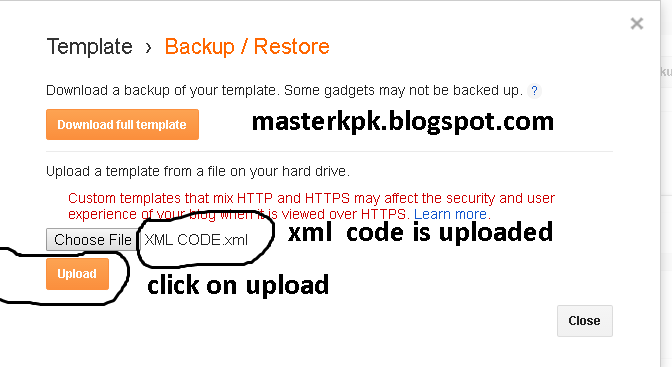
STEP (7) when you click on backup/restore new option will come so click on choose file.
blog template html


STEP (9) when you click on choose file upload your jpstation xml file .
blogging templates
STEP (10)when you select xml file then upload it.
Congratulations: You have successfully learned how to upload or install a blogger template with step by step guidance.the next is how to set this template(menu bar etc) and in details watch our video how to set blogger templates free and please subscribe our youtube channel


we hope all you understand this article if any problem iam here do comment i will answer of my best thanks.

sharing is your kindness 

How To Submit Sitemap To Google Webmaster Tools 2016

generate sitemap
Submit Sitemap To Google Webmaster Tools 2016


We discuss blogging course and today iam discuss how to submit sitemap in search engine. I hope all you will understand my previous lectures.


 In today lecture first of all watch video in the video we discuss how to submit sitemap.


How To Submit Sitemap To Google Webmaster Tools... by Masterkp-Tutorials


SITEMAP:

  A sitemap is a file where you can list the web pages of your site to tell Google and other search engines about the organization of your site content.     Sitemap is the map of blog all of our post is our blog sitemap when we submit our sitemap in webmaster tools. Google crawl will easy to crawl and indexed our pages in search engine.So sitemap have key role for the site seo(search engine optimization)..

How To submit sitemap to search engines  

To submit sitemap first of all watch video and follow the instruction in video.


How To Submit Your Site In Google In Urdu/Hindi 2016

As the blogging course is start  and we upload 4 lectures today we discused about how to add blog in search engine there are there are three popular search engines which is very popular.. 


We have planned that we will discuss about how to add blog in google and yahoo bing.but short of time and bussy days we only discuss how to add blog in google.

 Inshaallah in next lecture we will discuss how to add blog in yahoo bing so in today lecture first of all watch video.
how to write a blog

 In video we discussed first how to add follow email widget in blog by feedburner and second we discussed how to add our blog in google with help of webmaster tools.


 And sorry again short of time i didn't discussed about submitting sitemap . Inshaallah in next lecture we will discussed how to submit sitemap..by sitemap google indexed our site pages in google search engine. So Watch Video and subscribe our YouTube and dailymotion channel... Thanks


How To Submit Your Site In Google In Urdu/Hindi... by Masterkp-Tutorials
If you share this article thats will be your kindness.....